
Thursday, October 1, 2015
Excel Tips & Tricks: The Quick Access Toolbar
Do you ever find yourself clicking through the Ribbon in Excel (or other MS Office programs), because you can’t quite remember which tab you need? The Quick Access Toolbar allows you to easily customize your favorite or most often-used commands, saving time and reducing frustration.

Thursday, September 17, 2015
OE "Spotlight on Excellence" Recognizes Two AVPF Employees
The Organizational Excellence Spotlight on Excellence peer-recognition program highlights individuals who exhibit the principles of OE in their daily work and contribute to an institutional culture of quality. Two of our own were recently recognized:
 Jim Bowen (OSP)
 Andrew Yeung (MRP)
Jim Bowen (OSP)
Jim's nominator summed up his contributions as a “wizard.” While specializing in accounts with outstanding receivable balances that have been in collection, Jim remains solutions-oriented and dedicated to understanding the problem and seeing it through to resolution. This work requires extraordinary collaboration to untangle and uncover the root cause and bring it to closure.
In the last several months, Jim helped collect nearly $150,000 of difficult-to-collect accounts. His patience, persistence, and relationship-building skills brought closure to these problematic accounts that would otherwise go to settlement.
Andrew Yeung (MRP)
Andrew's nomination highlighted his proactive identification of a streamlining opportunity to automate a labor-intensive manual process. His collaboration and solutions-orientation helped create a new process tool that saves time and reduces errors when billing for A/V Services in the Jordan Hall Conference Center.
Andrew's nominator not only cited his technical competence but also Andrew's patience, flexibility, and excellent customer service. Andrew engaged key stakeholders and maintained open communications throughout the process redesign. In sum, Andrew's work was described as exceeding expectations.
Finance Job Openings
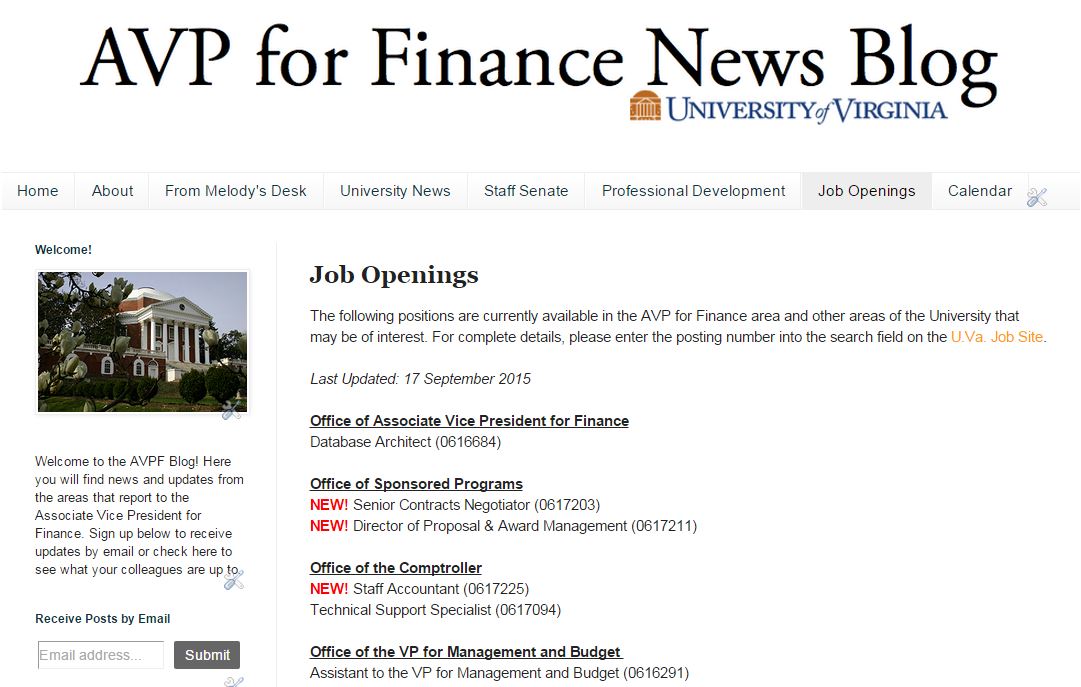
Looking for a new position within the finance area? The Job Openings page of the AVPF Blog has available positions within the finance departments and is updated with every edition of the blog.
Everything you should do before hitting 'send' on your work email
Harvard Business Review Associate Editor Gretchen Gavett breaks down the do's and don'ts of work emails and highlights how you can make your message stand out.
Click here to read the full article from EAB.
New: UVA BBA and Revenue Report in Discoverer
As a result of the Orange Team’s efforts, the MRP team
pleased to announce the availability of a new report in Discoverer. The
UVA BBA and Revenue Report provides additional information not in the Versus
report, including:
- Revenue not yet installed
- Amounts funded, but not budgeted
- Budget balance available
Additionally, a new view structure was utilized that allows
results to be returned in a couple of minutes, as opposed to 15 or more minutes
for the Versus report. Read
more about the new report and its best practices.
Thursday, September 3, 2015
From Melody's Desk
Well, summer is over and school is in session. We know this
from the students crowding the Student Financial Services’ counter last week,
the traffic on Emmet Street, the long lines at Chipotle, and football and
marching band practice occurring on Lambeth and Carr’s Hill Fields. :)
Congratulations to the folks in SFS who handled 4,800 phone
calls, 1,547 emails, and 742 walk-ins from students and parents over a span of
9 business days. Put the calculator away, I’ll do the math for you. That’s 533 calls, 183 emails, and 82 walk-ins per day. I appreciate the hard
work, patience, and professional approach from each SFS team member!
Speaking of UVa football, I snapped the below picture at
Lambeth Field, as I walked from my office at the newly renovated O’Neil Hall to
Carruther’s Hall (making sure to count my steps for the Hoo’s Well FallFitness Challenge).


Have you ever listened to a TED talk that you just wanted to
share? A friend shared a TED talk from Shawn Achor, positive psychology guru, with me: http://www.ted.com/talks/shawn_achor_the_happy_secret_to_better_work.
This one combines the best characteristics of a TED talk: funny, fast-paced, and an easy take-away. Two
excerpts:
“If we
can find a way of becoming positive in the present, then
our brains work even more successfully as
we're able to work harder, faster and more intelligently.”
“In
just a two-minute span of time done for 21 days in a row, we can
actually rewire your brain, allowing
your brain to actually work more optimistically and more successfully.”
Do you have a favorite TED talk? Send me an email or post a link in the comments – I’d love to see it.

PS: Don’t forget to
subscribe to the EVP/COO
Area newsletter to keep up on the news from other corners of the
University.
Finance Team Gears Up for Day of Caring
The United Way Day of Caring on September 16 is a time to make
real improvements in our community and team-build at the same time. Forty-four
volunteers will be working at three different sites:
1) Walker Upper Elementary School: Walker Upper
Elementary School (5th and 6th Grade) participates each year in the annual
Mix-it-up-at-Lunch event where students are assigned to a new lunch seat with
the purpose of giving them the opportunity to get to know students outside of
their social circle. Research shows that when students feel like they
know each other and can find things in common, they are less likely to bully
one another and more likely to help each other out. Volunteers will help
with a "get-to-know-you-bingo" game that allows students to see what
they have in common with the new students that they are assigned to sit with.
2) Nathanael Greene Primary School: Volunteers will
help paint 100-charts on the blacktops at the school. They will create a
10x10 grid with 100 spaces. Stencils will then be used to paint the
numbers, 1-100, in each box. They may even create large 100-charts on
tarps to be used within classrooms.
3) Western Albemarle High School: Volunteers will
weed and mulch the grounds and do some painting.
A kickoff breakfast rally will be held at the Albemarle
Square Shopping Center beginning at 7:30am. A fresh breakfast and lots of coffee will be
available. Thanks to everyone who is willing and able to participate!
Data Governance, Continued
 Last
month, we shared a quick video explanation of various data governance topics.
This month, Forrest and Tom are back with the second half of that discussion—to
help you better-understand data governance at the University, and how the MRP
team is involved. Watch and share this video!
Last
month, we shared a quick video explanation of various data governance topics.
This month, Forrest and Tom are back with the second half of that discussion—to
help you better-understand data governance at the University, and how the MRP
team is involved. Watch and share this video!
Excel Tips & Tricks: The Ugly “#DIV/0”
When you create formulas in Excel worksheets you will often
find that your formula is set up correctly, but certain cells will return a
result of “#ERROR,” “#N/A,” or “#DIV/0!.” These outputs are generally not desirable
when sharing the worksheet with others.
Add the “IFERROR” function to your formula to dictate what is displayed instead ofthe error message. For example, to tell Excel to display “-“ instead of
“#DIV/0” whenever it encounters a divide-by-zero error, write the formula as
“=IFERROR(A1/B1,”-“) where the characters in quotes at the end are what will
display if Excel formula results in an error.

Thursday, August 20, 2015
MRP Staffing & How to View Reporting Relationships in Outlook
The Managerial Reporting Project recently added more staff,
and is rapidly filling additional openings on the team. With the recent and
projected growth, the team realigned its structure to operate more effectively.


Forrest Swope (Data
Stewardship Lead), Mark Anderson (Decision
Support Systems Lead), Scott Newman (Director
of Reporting Technologies), and the Change Management Lead (to-be hired) serve on Judy DiVita’s
leadership team. All other staff report up to either Judy or someone on her
leadership team. The project will continue to partner closely with ITS, with
leadership support from Teresa Wimmer.
These changes will be reflected in the Integrated System in
September. But did you know you can see manager/direct report information right
in Outlook? For example, you can see Judy DiVita’s organization by hovering-over
her name in an outlook email:
Mouse-over a name to see that person’s contact card. Click the down
arrow on the right expand the contact card.
|
Select “Organization” to see
the person’s Manager, peers that share the Manager…

|
HR-Finance User Group Community and Online Help
The contract with the UVa
help desk vendor to provide Integrated System help and support ended in May
2015. So where can you go for help when you need it? In addition to the system
toolkits where you can view training guides, and Learner Home in Employee Self-Service
where you can access and review training topics, you can find help online from
your colleagues and subject matter experts from the HR-Finance User Group Community! This is the online place for users
of the Integrated System to find and give help and exchange ideas. Whether you
are a new user or a subject matter expert (SME), this is a vibrant community
where questions, answers, and discussions are welcomed and encouraged!
To join
the group:
- Go to “My Workspace” on UVa Collab. You will authenticate through NetBadge if you don’t already have an active NetBadge session open.
- Click “Membership” in the left column.
- Click “Joinable Sites” near the top.
- In the search box in the upper right, enter “HR-Finance” and click “Search”.
- You’ll see HR-Finance User Group in the resulting Worksite list. Click “Join”.
- Once you have joined the group, navigate to the discussion forums from the menu. Whether you have knowledge to share, need help, or both, this resource is for you!
Once you find the topic, click “Do It!” to open the customized help. The help topic opens in a smaller window which gives step-by-step instructions to follow as you complete the work in the system. See the instructions for accessing andusing the online help if you are using online help for the first time or if you need more detailed instructions.
Bookmark This: ResearchUVa
In case you didn’t
know…
ResearchUVa is HERE!


ResearchUVa is the result of a year-long collaboration between the Office of Sponsored Programs, ITS, Organizational Excellence, and the research community. This first phase provides a read-only portal for easy access to research data. Access is granted through Netbadge to all faculty with a research proposal or award and all administrators named as a fiscal contact on a research project in the Integrated System.Use these links to:
For help, please
email the ResearchUVa-help@virginia.edu
listserv. Free Courses at Lynda.com
Did you know that
Lynda.com, the catalog of more than 3,500 online courses, is now available
free of charge to UVa Staff and Faculty? Courses include everything from Having Difficult Conversations, to Project Management, to Microsoft Excel. Thanks to our UVa
Library colleagues for making this possible!
To
log into Lynda.com:
- Go to www.Lynda.com.
- Click on “Log In” at the top right corner of the
screen.
- Choose “Organization Login” instead of the default
“Individual Login”.
- Using the option at the bottom where it asks for your
organization’s URL, enter the UVA homepage URL (www.virginia.edu) and click “Go”. After your
first time logging in, you will simply click on the bottom “Go” button.
There is no need to enter a username and password on the initial login
screen.
- This will take you to NetBadge.
- Once you log into NetBadge you will be able to create
your profile and browse the site.
How to Do Walking Meetings Right
"Recent research finds that the act of walking leads to increases in creative thinking. This certainly supports the usefulness of walking meetings. Plenty of anecdotal evidence also suggests that walking meetings lead to more honest exchanges with employees and are more productive than traditional sit-down meetings."
"Those who participate in walking meetings are 5.25% more likely to report being creative at their jobs than those who do not. Additionally, the responses suggest that walking meetings support cognitive engagement, or focus, on the job. Those who participate in walking meetings are 8.5% more likely to report high levels of engagement."
Read more about the benefits of walking meetings (and how to do them right) at the Harvard Business Review.
"Those who participate in walking meetings are 5.25% more likely to report being creative at their jobs than those who do not. Additionally, the responses suggest that walking meetings support cognitive engagement, or focus, on the job. Those who participate in walking meetings are 8.5% more likely to report high levels of engagement."
Read more about the benefits of walking meetings (and how to do them right) at the Harvard Business Review.
Subscribe to:
Posts (Atom)